At its core, fast queries against data on disk come down to filtering out as much unnecessary data as possible while the system is still working in memory.
Storage Internals
This post only discusses the MergeTree family of table engines.
At the storage layer, ClickHouse organizes data into directories on disk. Once enough data has been written, each data part contains a separate .bin data file and a .mrk mark file for every column, plus a primary key index file called primary.idx (a sparse index).
If idx or mrk files are stored in compressed form, their suffixes become
.cidxand.cmrk. There are also multiple mark-file formats such as.mrk2and.mrk3.
|
|
Partitions
You can define a partition key with PARTITION BY. In most cases, partitioning by month with toYYYYMM(Date) is recommended.
With that setup, the underlying data is stored month by month in separate directories, which makes it easier to filter data quickly during queries.
Part names follow the format 202405_minBlock_maxBlock_level. Every insert creates a new data part. After some time, parts that belong to the same partition are merged together, so it is generally better to insert data in batches. Once a merge is complete, the old parts are marked inactive rather than deleted immediately, and are cleaned up later.
|
|
Note: data is naturally ordered only within the same partition folder. Deduplication in ReplacingMergeTree also only happens within the same partition. The same is true for parts that have not yet been merged; sorting and deduplication happen during the merge process.
Manually Triggering a Merge
You can manually trigger a merge with:
OPTIMIZE TABLE table_name PARTITION partition_name
Or merge the entire table with:
OPTIMIZE TABLE table_name FINAL
Columnar Storage
Sorting
You can specify multiple sort keys with ORDER BY, and the data will be stored in that order. Columnar storage plus sorted storage provides two major benefits:
- A sorted structure makes binary search possible.
- Sorted data generally compresses better.
Each .bin file is a column data stream. Data parts can be stored in either Wide or Compact format. In Wide format, every column is stored in its own file. In Compact format, all columns are stored in a single file. Compact format can improve performance when inserts are small but frequent.
The data-part format is controlled by the table engine settings
min_bytes_for_wide_partandmin_rows_for_wide_part. If the number of bytes or rows in a data part is below the configured threshold, the part is stored inCompactformat; otherwise, it is stored inWideformat.
Relationship Between the Primary Key and the Sort Key
Primary key ∈ sort key
- If you do not specify a primary key explicitly, the sort key is used implicitly as the primary key.
- Data is stored in order according to the sort key, which means the primary key must be a prefix of the sort key.
- The primary key index stays resident in memory.
Storage Format
Each column is stored in its own .bin file, and the rows are tightly ordered by primary key.
Physically, the data is divided into compressed blocks. Logically, it is divided into granules. A compressed block and a granule can have a one-to-many or many-to-one relationship.
Granules
A granule is the smallest indivisible dataset processed by ClickHouse. The number of rows per granule is controlled by index_granularity, which defaults to 8192.
For tables with adaptive index granularity enabled, which is the default, some granules may contain fewer than 8192 rows depending on row size. The exact behavior is controlled by
index_granularity_bytes.
Compressed Blocks
A compressed block is typically between 64 KB and 1 MB. If the data for a granule is small, one compressed block may contain multiple granules. If a single granule is large, its data may span multiple compressed blocks. During queries, the relevant compressed block is read and decompressed into memory.
Indexes
Primary Key Index
The first row of each granule is extracted to form the sparse primary key index. That means:
number of primary-key index entries == number of granules
Mark Files
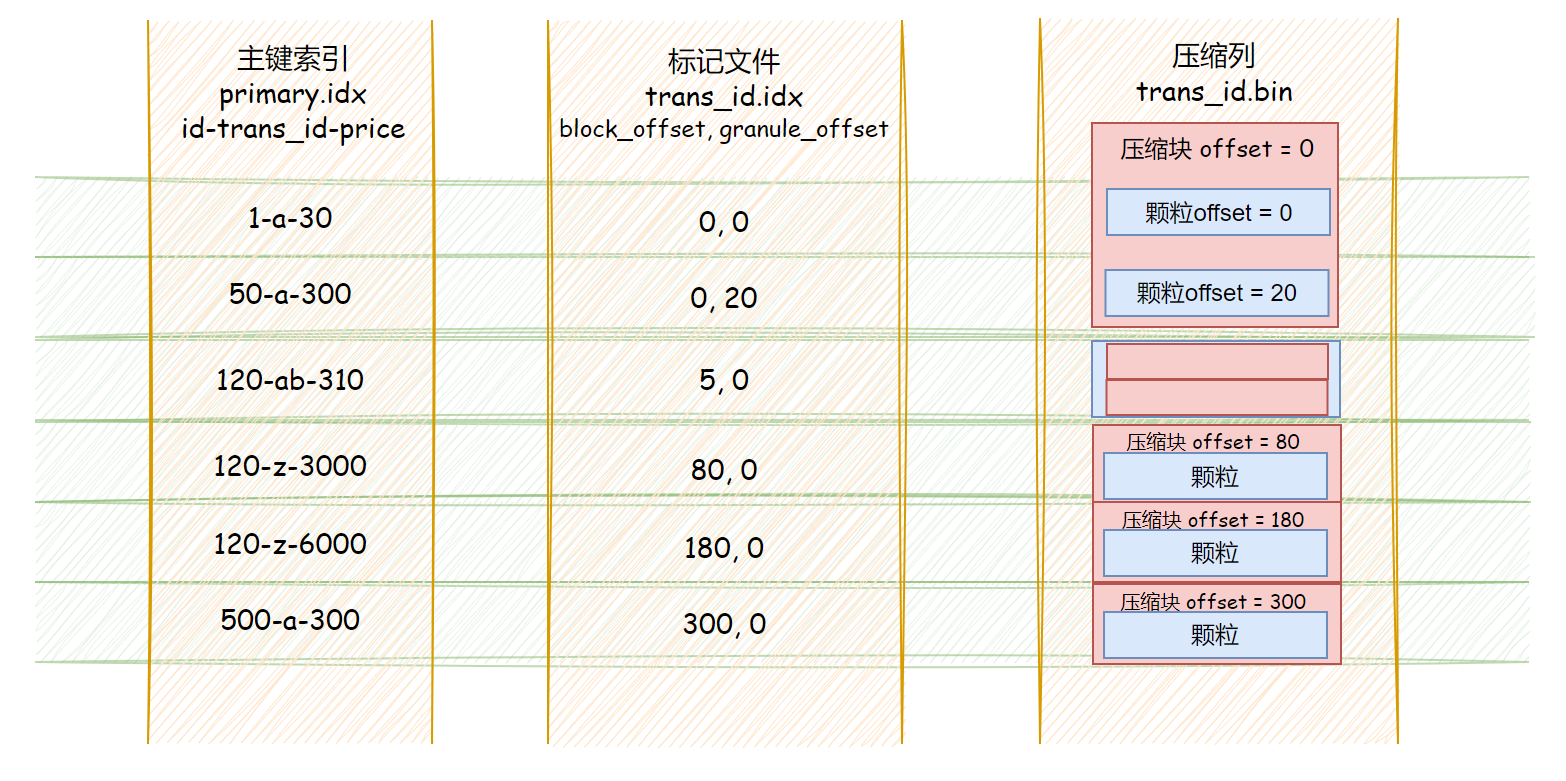
Mark files act as the bridge between the primary key index and the compressed column data. Each row in a mark file stores two offset values, and:
number of primary-key index entries == number of rows in the mark file
- The first column stores the offset of the compressed block inside the full compressed column file (
.bin). - The second column stores the offset of the target data inside the decompressed block.
Because the two columns in a mark file are fixed-length fields, you can locate the corresponding entry by the index position of the primary-key row.
Then, using those two offsets from the mark file, you can locate the corresponding granule.
Skip Indexes
These are secondary indexes.
Summary
Why Do We Need Mark Files?
Why not store the physical location of each indexed granule directly inside the primary index?
Because the primary index needs to stay in memory. Without separate mark files, offsets for every column would also need to be stored inside the primary-key index, which would waste memory.
Why Are There Compressed Blocks?
- Why are granules and compressed blocks not one-to-one?
Compressed blocks are mainly a storage and I/O optimization, while granules exist to tune query efficiency. Keeping them decoupled is more flexible.
- If
.binis already a file, why split it internally into compressed chunks?
Because compression algorithms depend on local data context, you cannot simply jump to an offset and decompress that one tiny region in isolation. By splitting raw data into chunks before compressing it, ClickHouse reduces how much data has to be read and decompressed for each query.
Multiple Primary-Key Optimizations
In essence, ClickHouse creates a full copy of the data and rebuilds the underlying storage layout in the order of the new primary key. There are three common approaches:
- Create a new table with a different primary key: this requires double writes and manual maintenance, and queries must choose the table explicitly.
- Create a materialized view: synchronization happens automatically, but queries still need to choose the target table explicitly.
- Add a projection: synchronization is automatic, and ClickHouse can choose the most appropriate layout automatically at query time.
Binary Index File Analysis
I do not know enough C++ to feel comfortable reading the source code directly, so I approached the problem from the binary files themselves instead. By combining guessing with validation, I tried to infer the layout of the index files. For that reason, this article only analyzes some numeric and string-based index layouts.
|
|
Now insert the following data:
| id | trans_id | product_id | price |
|---|---|---|---|
| 1 | abcdefg | product | 15 |
| 2 | abcdefgh | product | 30 |
| 3 | abcdefghijklmn……opqrstuvwxyz (total length 260) | product | 3000 |
| 4 | b | product | 3000 |
| 5 | c | product | 3100 |
| 6 | d | product | 3400 |
Then the index layout should look something like:
UInt16-String-UInt16
That is:
1-abcdefg-15 3-abcdefg...xyz-3000 5-c-3100
primary.idx
Next, open primary.idx in hexed to verify the hypothesis:
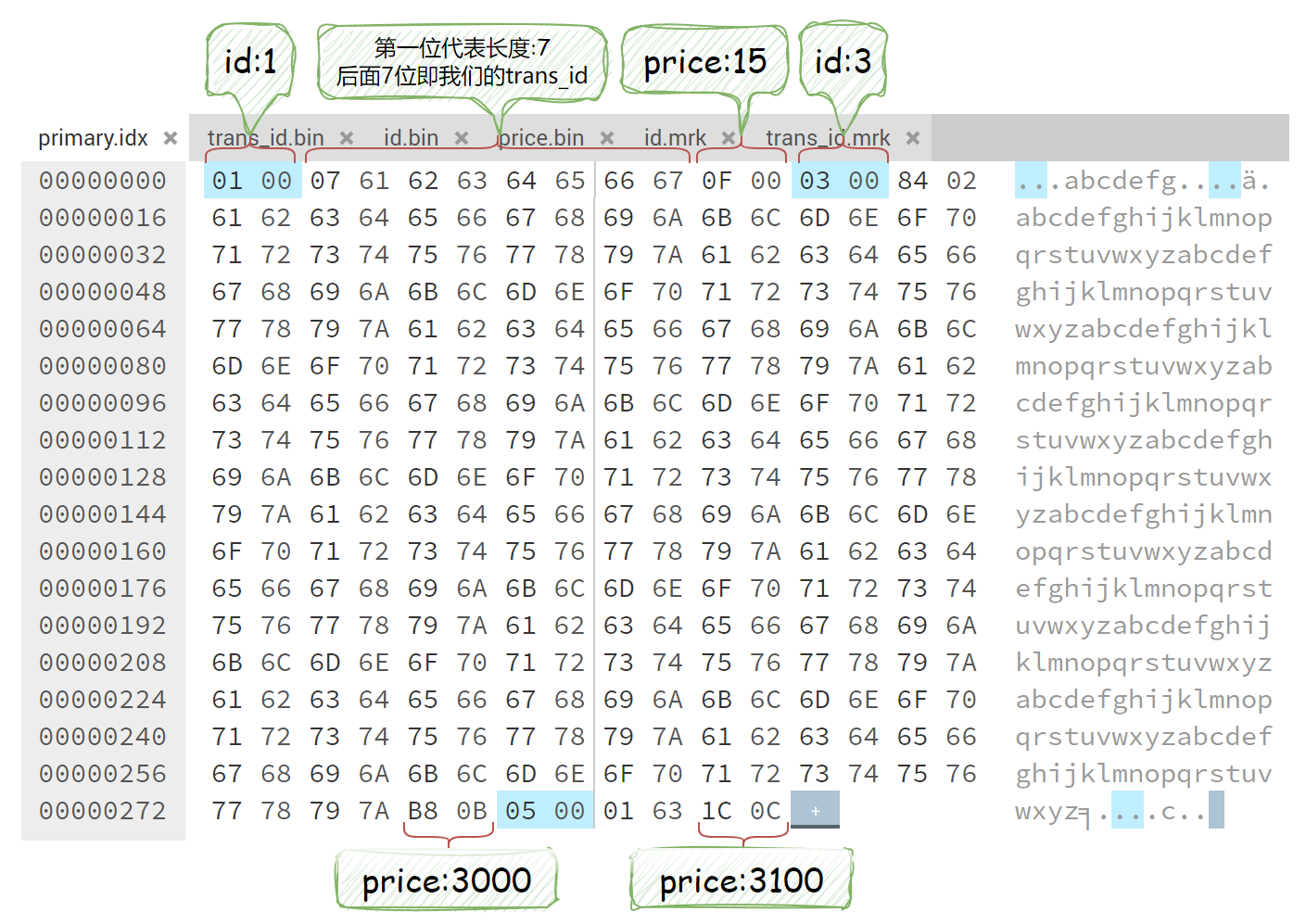
- Numeric values use a fixed number of bytes based on their defined type.
- Strings are stored as a length field plus the string data, and the length field itself may occupy one or more bytes depending on the string size.
At this point an obvious question comes up: if the string length is larger than a single byte can represent, how is it stored?
My personal guess, which seems to work within a certain range, is the following. Assume the length is stored with two bytes, whose decimal values are A and B.
Then the string length would be:
A + 128 * (B - 1)
Using the second indexed row above:
132 + 128 * (2 - 1) = 260
You can also calculate it directly in JavaScript:
parseInt('84', 16) + 128 * (parseInt('02', 16) - 1) = 260
Note: the value of B is probably only valid in a small range. Otherwise it would be hard to separate the length field cleanly from the string data. If anyone understands the C++ implementation and wants to explain it at the source-code level, that would be even better.
column.mrk
.mrk is a two-column, multi-row file. The number of rows matches primary.idx, and the rows correspond one-to-one in order.
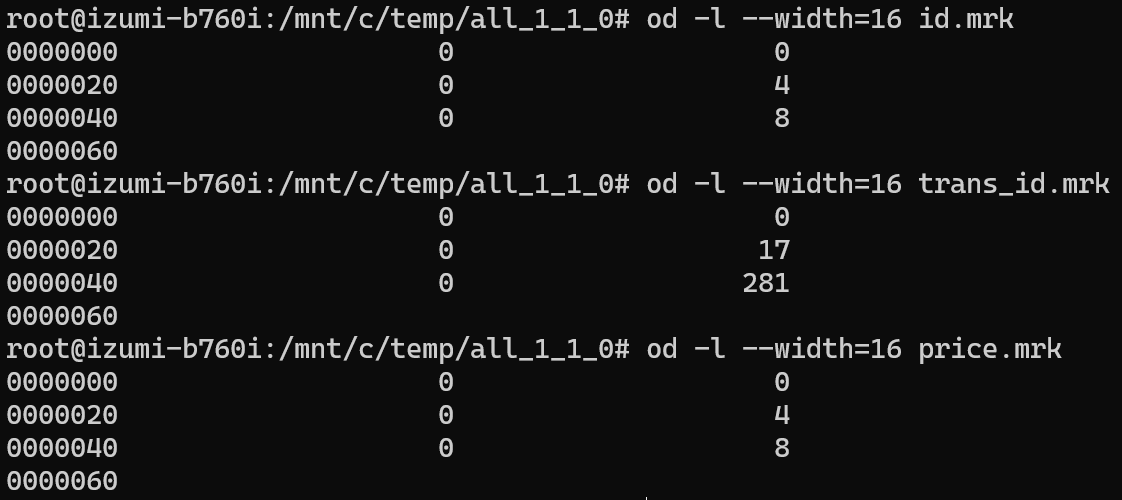
For example, id.mrk has three rows, which means there are three granules. The first column is 0 for every row, which means they all belong to the same compressed block. The second column is 0, 4, and 8, which lines up exactly with the decompressed lengths of the id column.

trans_id.mrk stores a variable-length field, so the second column becomes 0, 17, and 281.
column.bin
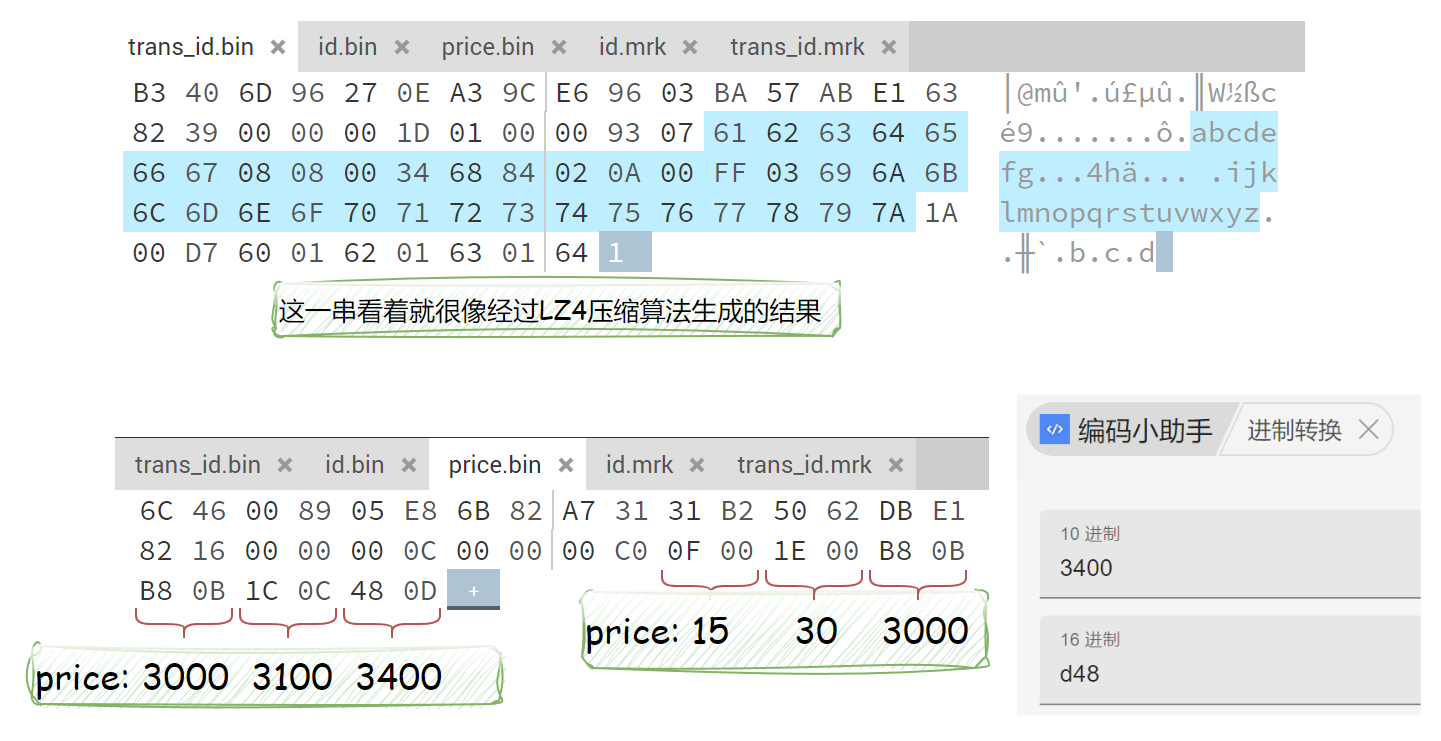
The .bin file is where the final column data is stored. Since it is compressed, opening it directly only gives you a rough glimpse of the contents.
Each compressed block consists of a header plus the compressed payload. The header contains information such as the compression method and the sizes before and after compression.
Vectorized Engine
ClickHouse makes very good use of the CPU’s SIMD instruction set: Single Instruction Multiple Data.
SIMD (Single Instruction, Multiple Data) is a way of processing multiple pieces of data with a single instruction. By increasing register width, execution-unit width, and the number of compute lanes, each instruction can process more values in parallel. A normal instruction may handle only a couple of values per cycle, while a SIMD instruction can handle dozens.
Multithreading
ClickHouse uses all available resources on the server to process large queries in the most natural parallel way it can.
Because the data is already divided by partition, by column, and by granule, it is straightforward to parallelize reads. A single query can therefore consume a large amount of CPU. The tradeoff is that QPS is usually not very high.
Distributed Storage and Replication
ClickHouse can coordinate data through ZooKeeper and store data across multiple machines.